Stock forecast
See how fast each material is used on site, when it will run out, what upcoming tasks need, and order or request what is short.
On this page
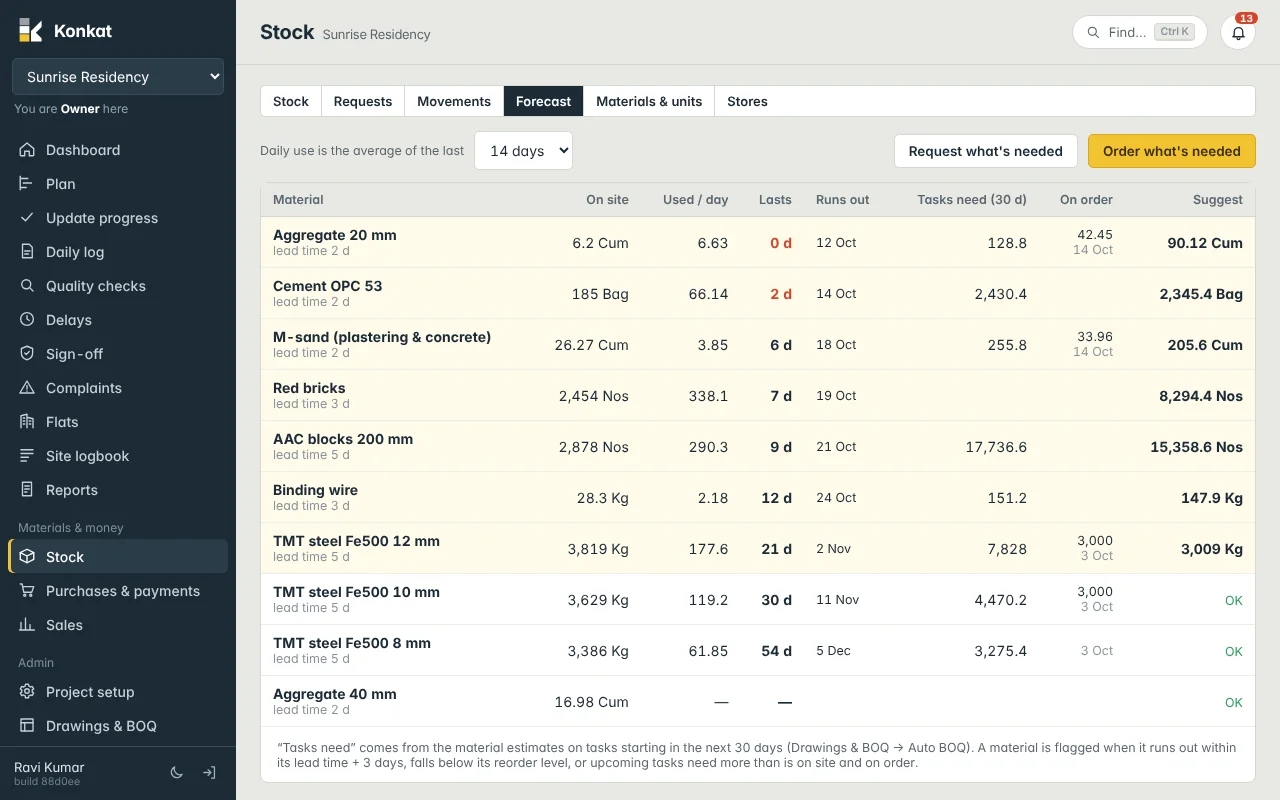
The Forecast tab answers the storekeeper’s daily question: what will run out before the next delivery can arrive? It looks at how fast the site has been using each material, what is in the project’s stores, what tasks starting soon will need, and what is already on order.
What each column means#
| Column | How Konkat works it out |
|---|---|
| On site | Stock in all stores that belong to this project (central yards are not counted). |
| Used / day | Material used on site in the last 7, 14 or 30 days (your choice in “Daily use is the average of the last”), divided by the days since it was first used in that window. |
| Lasts | On site ÷ used per day. Shown in red when it is within the lead time + 3 days. |
| Runs out | Today + days it lasts. |
| Tasks need (30 d) | From the material estimates on tasks not yet finished that start in the next 30 days. See Auto BOQ. |
| On order | Not yet received on purchase orders that are Ordered or Partly received, with the latest expected date. |
| Suggest | How much to get now, or OK. |
The material name line also shows its lead time, set in Materials and units.
When a material is flagged#
A row is highlighted and gets a suggested quantity when any of these is true:
- it runs out within its lead time + 3 days;
- it is below its reorder level;
- tasks starting in the next 30 days need more than is on site + on order.
The suggestion covers the bigger of (what upcoming tasks need) and (daily use × (lead time + 14 days)), plus the reorder level, minus what is on site and on order.
Worked example — cement#
The site store has 185 bags of Cement OPC 53. Over the last 14 days the site used about 66 bags a day, so it lasts 2 days. Lead time is 2 days, so 2 ≤ 2 + 3 and the row is flagged. Upcoming slab and blockwork tasks need 2,430.4 bags in the next 30 days and nothing is on order.
- Cover = the bigger of 2,430.4 and 66.14 × (2 + 14) ≈ 1,058 → 2,430.4
- Suggest = 2,430.4 + reorder level 100 − on site 185 − on order 0 = 2,345.4 bags
Aggregate 20 mm shows 6.2 Cum on site, 6.63 Cum a day — it lasts 0 days — with 42.45 Cum on order expected 14 Oct. Konkat still flags it, because the order will not arrive in time.
Act on the forecast#
- Pick the window — 7 days during a busy slab week, 30 days for a steadier picture.
- Check the flagged rows — adjust in your head for things Konkat can’t know (a pour postponed, a supplier holiday).
- Request what’s needed — makes a material request with every flagged material and its suggested quantity, for you to edit and send. Needs Request material.
- Or Order what’s needed — opens a new purchase order filled with the flagged materials; choose the supplier, check rates and place it. Needs Purchase orders.
Split the order by supplier: remove the lines a supplier doesn’t carry before saving, then use Order what’s needed again for the next supplier.
Getting good numbers#
- Record usage daily — the forecast learns only from Used on site, mostly from end-of-day logs. See Daily log.
- Receive every delivery — otherwise stock looks low or below zero.
- Estimate your tasks — “Tasks need” is empty until tasks have a type of work and quantity. See Auto BOQ.
- Set lead times and reorder levels on each material.
Common questions#
Why is a material missing from the forecast?#
It appears only once it is in a project store, has been used, is needed by an estimated task, or is on order.
Who can see the forecast?#
Anyone with See stock. The buttons need Request material or Purchase orders.