Quality checks
Record QC inspections with photos, raise concerns, assign the fix and close each entry with a full trail.
On this page
The Quality checks screen keeps every inspection on site as one visible thread: what was checked, what was wrong, who fixed it, and who accepted the fix. A task can have as many QC entries as you need — one per floor, per flat or per room.
Who can do what#
- Record a check, assign, reassign and close — people whose role has Quality checks. Built-in roles: Owner, Admin, Engineer and QC.
- Record the fix — the person the concern is assigned to, even if their role has no QC rights (for example a Supervisor like Imran Khan), or anyone with Quality checks.
- See QC entries — everyone on the project team.
If a person’s profile has Must attach a photo to every log and QC entry ticked, Konkat will not save their check or fix without a photo. See Team and people.
How a QC entry moves#
Each entry shows a status pill. The flow is check → concern → follow-up → rectification → closure.
| Status | Meaning | What happens next |
|---|---|---|
| No issues | Checked, nothing wrong. | Someone with QC rights can Close QC entry. |
| Concern raised | Something needs fixing, nobody assigned yet. | Assign a person and a fix-by date. |
| Fix pending | Assigned and waiting for the fix. | The assignee uses Record the fix. |
| Fixed — awaiting closure | Fix recorded with rework days and photos. | QC checks again and uses Close QC entry. |
| Closed | Work accepted. | Nothing — the entry stays on record. |
The list has three tabs: Open concerns (concern raised, fix pending, fixed — awaiting closure), Assigned to me and All checks. A concern past its fix-by date shows overdue in red.
Record a QC check#
- Start a check — on Quality checks press New QC check. On a phone you can also use the yellow + → QC check.
- Pick the task — for example Concrete pouring. Use Change task if you picked the wrong one.
- Say where — choose the Floor (or Any / whole task), and for flat-wise tasks the Flat and Room.
- Describe it — fill What was inspected?, e.g. “Column plumb and size after de-shuttering of first set (C1–C12)”, and add photos.
- Raise a concern if needed — tick Raise a concern — something needs fixing, write What’s wrong?, add photos of the defect, choose Assign fix to (or Assign later) and a Fix by date.
- Save — press Save QC entry.
When you raise a concern Konkat also logs a QC rework delay on that task with 0 days. When the fix is recorded, the Rework days lost you enter are filled into that delay, so rework shows up in Delays and reports and traces back to this QC entry.
Assign, fix and close#
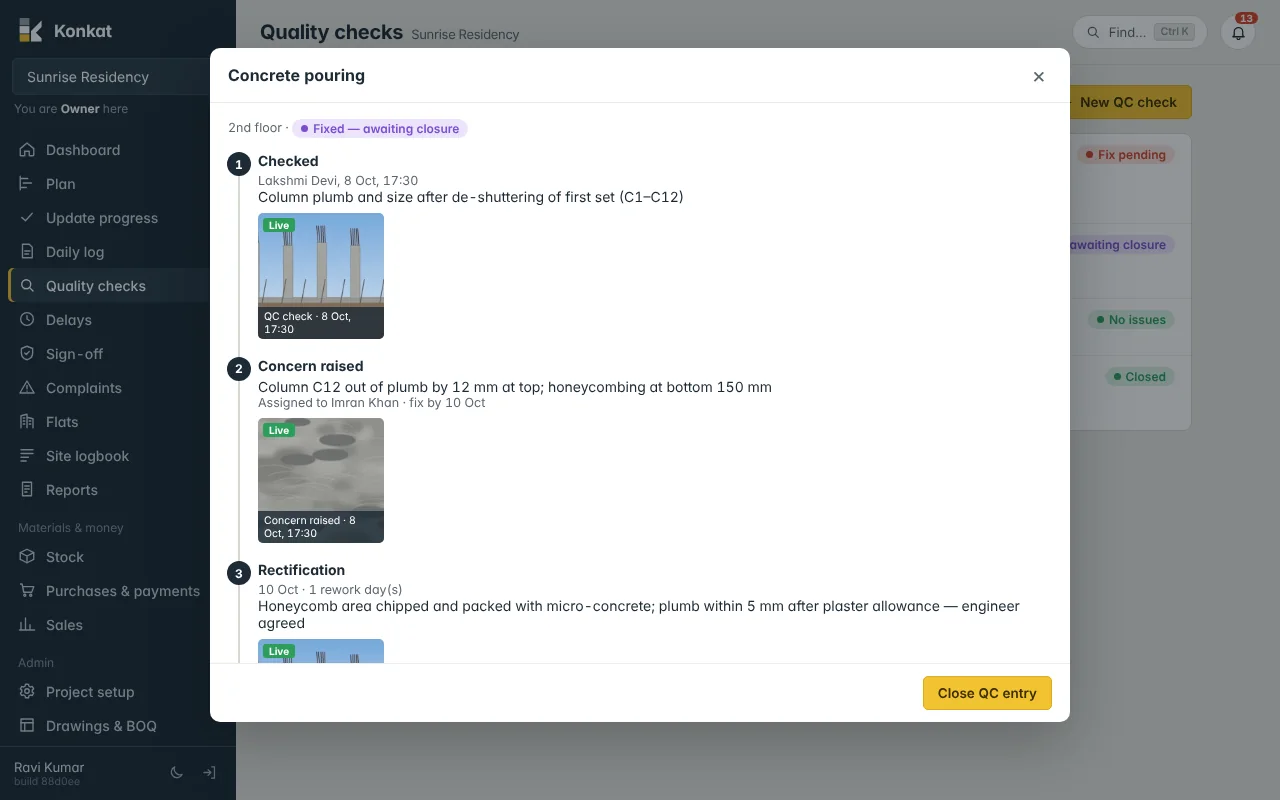
Tap any entry to open its thread. The steps are numbered: Checked, Concern raised, Rectification and Closure. The buttons at the bottom depend on where it stands and on your rights:
- Assign / Reassign — pick the Person to fix it from the project team and a Fix by date. That person gets a notification “QC concern assigned to you”.
- Record the fix — write What was done?, the Date, Rework days lost (half days allowed, e.g. 1.5) and after-rectification photos. The person who did the check is notified “Rectification done — ready for QC closure”.
- Close QC entry — confirms the work is acceptable. A closing photo is useful for the report. An entry with a concern can only be closed after the fix is recorded.
Worked example#
Lakshmi Devi (QC) checks the 2nd floor columns after de-shuttering. Column C12 is 12 mm out of plumb with honeycombing at the bottom. She raises a concern, assigns Imran Khan (Supervisor) with fix by 10 Oct. Imran chips and packs the area with micro-concrete and records the fix on 10 Oct with 1 rework day and photos. Lakshmi gets a notification, checks again and closes the entry. The Concrete pouring task now shows a 1-day QC rework delay in Delays.
QC and sign-off are different#
QC entries are inspections you record any time. Sign-off is the approval a finished task waits for before it counts as finished. Use QC for defects during work, and sign-off to accept completed work. Snags found after work is finished — or customer complaints after handover — are better logged as Complaints.
Common questions#
Can a supervisor without QC rights close a concern?#
No. They can record the fix if it is assigned to them, but closing needs a role with Quality checks.
Where do QC entries show up besides this screen?#
In the Site logbook, the QC part of Reports, and the rework days in Delays.
Can I check one room of one flat?#
Yes, for tasks recorded per flat and room: choose the floor, then the flat, then the room.