Estimate recipes
Recipes say how much material one unit of work takes, with wastage. Adjust the standard ones to your specifications.
On this page
A recipe says how much of each material one unit of work takes, with a wastage allowance. For example, 1 cum of M20 concrete = 8.06 bags cement + 0.42 cum sand + 0.84 cum 20 mm aggregate. When a task has a recipe and a quantity, Konkat works out its materials, and the Auto BOQ adds them up for the whole plan.
Where to find them#
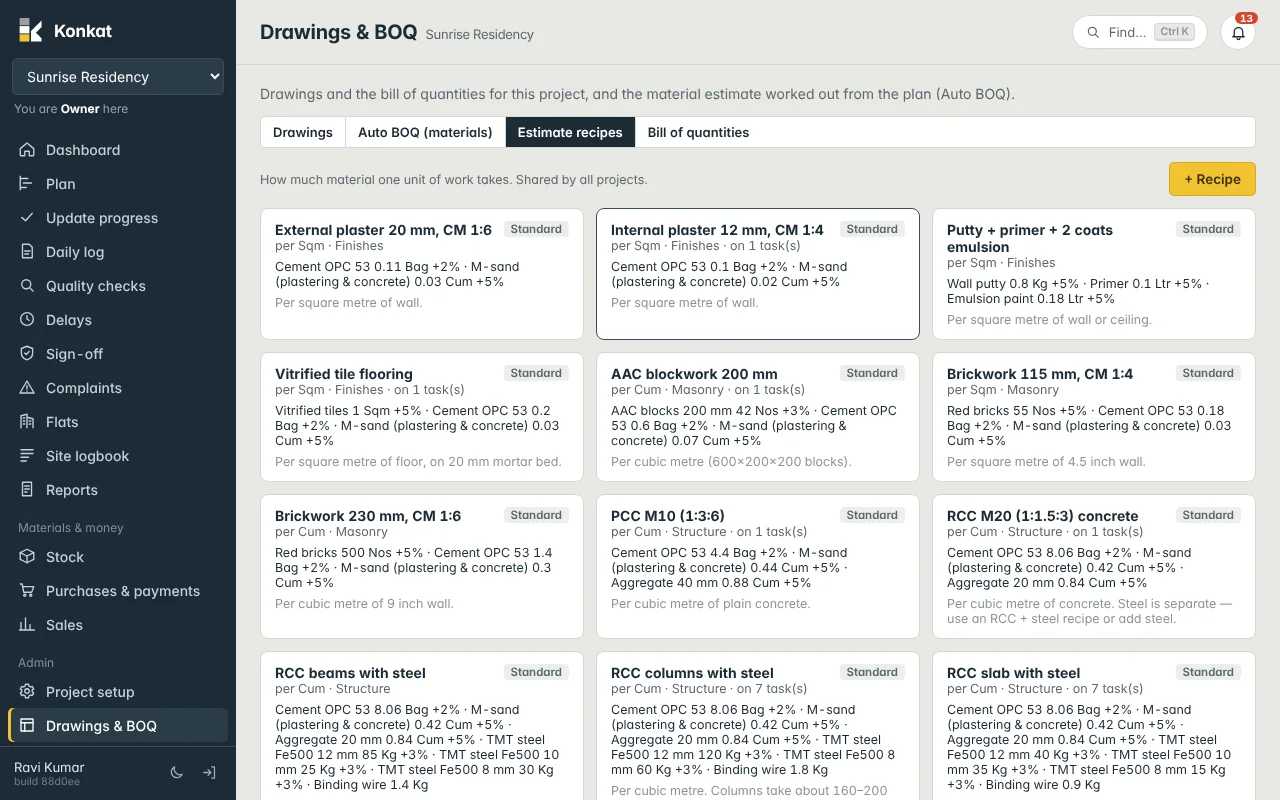
Drawings & BOQ → Estimate recipes. Recipes are shared by all projects. Each card shows the name, the unit of work, the category, how many tasks use it (“on 7 task(s)”), its materials with wastage, and the tag Standard for the ones Konkat comes with.
Who can change recipes#
Anyone can see them. Adding, editing and deleting needs Drawings, BOQ & estimates on at least one project — Owner, Admin and Engineer by default.
Standard recipes#
| Recipe | Per | Materials (wastage) |
|---|---|---|
| RCC M20 (1:1.5:3) concrete | Cum | Cement 8.06 bag (+2%), sand 0.42 cum (+5%), 20 mm aggregate 0.84 cum (+5%) |
| RCC slab with steel | Cum | As M20 + TMT steel 90 kg (+3%) + binding wire 0.9 kg |
| RCC columns with steel | Cum | As M20 + steel 180 kg (+3%) + binding wire 1.8 kg |
| RCC beams with steel | Cum | As M20 + steel 140 kg (+3%) + binding wire 1.4 kg |
| PCC M10 (1:3:6) | Cum | Cement 4.4 bag, sand 0.44 cum, 40 mm aggregate 0.88 cum |
| Brickwork 230 mm, CM 1:6 | Cum | Red bricks 500 (+5%), cement 1.4 bag, sand 0.3 cum |
| Brickwork 115 mm, CM 1:4 | Sqm | Red bricks 55 (+5%), cement 0.18 bag, sand 0.025 cum |
| AAC blockwork 200 mm | Cum | AAC blocks 42 (+3%), cement 0.6 bag, sand 0.07 cum |
| Internal plaster 12 mm, CM 1:4 | Sqm | Cement 0.1 bag, sand 0.016 cum |
| External plaster 20 mm, CM 1:6 | Sqm | Cement 0.11 bag, sand 0.027 cum |
| Vitrified tile flooring | Sqm | Tiles 1 sqm (+5%), cement 0.2 bag, sand 0.025 cum |
| Putty + primer + 2 coats emulsion | Sqm | Putty 0.8 kg, primer 0.1 ltr, emulsion 0.18 ltr (each +5%) |
These are typical thumb-rule figures. Check them against your structural drawings, mix designs and contractor norms before you rely on them.
Add or adjust a recipe#
- Open — press + Recipe, or tap a card to edit it.
- Name — e.g. “RCC M25 slab with steel”.
- Per unit of work — the unit the task quantity will be in: Cum for concrete and walls by volume, Sqm for plaster, tiling and painting.
- Category and description — Structure, Masonry, Finishes…; a note like “Per cubic metre. Slabs take about 80–100 kg steel per cum.”
- Materials — for each: the Material, Qty per unit of work in the material’s stock unit, and Wastage % (starts at 2). Use + Material for more lines.
- Save.
Quantities are in each material’s counted-in unit — cement in Bag, sand in Cum, steel in Kg. A recipe needing 0.42 cum of sand per cum is right even though you buy sand in Brass.
Worked example — your own M25 slab#
Your structural consultant specifies M25 with about 100 kg steel per cum, split 40 kg 12 mm, 35 kg 10 mm and 25 kg 8 mm. Copy the idea of “RCC slab with steel” into a new recipe “RCC M25 slab with steel” per Cum: cement 8.6 bag (+2%), sand 0.40 cum (+5%), 20 mm aggregate 0.80 cum (+5%), 12 mm steel 40 kg (+3%), 10 mm steel 35 kg (+3%), 8 mm steel 25 kg (+3%), binding wire 1 kg. Use your own mix design figures — these are only an illustration.
Changing a recipe that is in use#
The Auto BOQ is always worked out from the current recipe, so editing a recipe changes the estimate of every task that uses it, on every project. (This is different from templates.) Materials you already copied into a task’s materials list with Put these in the materials list don’t change.
Delete removes a recipe no task uses; if tasks use it, it is switched off instead (“In use — switched off instead”) and hidden from the lists. Tick or untick Switched off in the editor.