Delays
Log days lost on a task with their cause, add them to the plan so later work moves, and read the Delays screen: causes, most affected tasks and the knock-on effect of overruns.
On this page
Every project loses days — rain, a late steel lorry, a short crew. Logging each delay with its cause, on the day it happens, tells you later where the time really went. Konkat can also add the lost days to the task, so everything linked after it moves and the forecast finish stays honest.
Log a delay#
- Start — on the Delays screen tap Log a delay, or on a phone tap + → Log a delay.
- Pick the task — from the task list (all tasks, including later ones). Tap Change task if you picked the wrong one.
- Date and Days lost — half days are allowed, e.g. 0.5.
- Where (optional) — a floor or a flat, or leave Whole task.
- What caused it? — tap Labour, Material, Site conditions, Management or Technical.
- Reason — tap a common reason (e.g. Rain, Cement shortage, Late approval) or type a new one. New reasons are remembered for next time.
- Notes — any detail, e.g. Deccan Steels lorry reached at 4 pm; tying started next morning.
- Add these days to the task’s plan — ticked by default. See below.
- Tap Log delay.
The causes and their reasons#
| Cause | Ready-made reasons |
|---|---|
| Labour | Worker absenteeism, Crew shortage, Skill gap, Labour strike |
| Material | Late tile supply, Cement shortage, Steel delay, Wrong material delivered |
| Site conditions | Rain, Water logging, Power cut, Access blocked |
| Management | Late approval, Payment delay, Coordination gap |
| Technical | Drawing change, Design clarification, Equipment breakdown |
A sixth cause, QC rework, is recorded from Quality checks when a concern costs days; you don’t pick it here. Those delays show (from QC) in the delay log.
Add these days to the task’s plan#
With this ticked, the days lost are added to the task as extra days. The task’s bar gets longer and linked tasks after it move out. If this task is already late, the form also lists the later tasks it is Already pushed downstream, with the days for each.
Untick it when the delay doesn’t change the plan — for example a half day lost on a task that had slack. The delay is still counted in the cause analysis.
Extra days from delays are not plan revisions and don’t need a reason on the Plan — the delay itself is the reason. They show as +2 added on the task page and in Planned vs actual on the Dashboard. See Plan changes after the start.
The Delays screen#
Open Delays from the menu. Choose a date range at the top (e.g. Full project, Last 14 days, or custom dates).
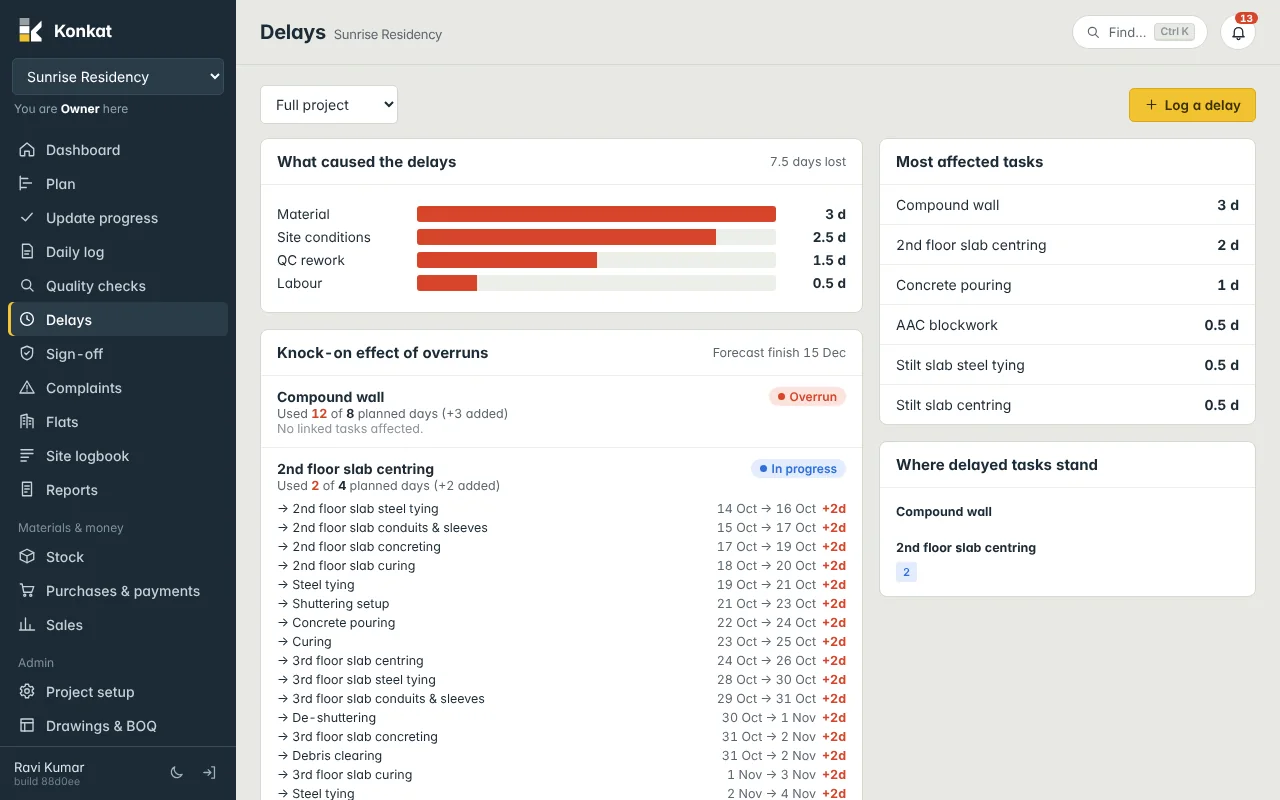
- What caused the delays — days lost by cause, biggest first, with the total.
- Knock-on effect of overruns — every task that is overrunning or has extra days, with Used 2 of 4 planned days (+2 added), and each later task it pushes: planned start → expected start and the days late, e.g. +2d. The Forecast finish of the project is shown at the top.
- Most affected tasks — the tasks that lost the most days.
- Where delayed tasks stand — the floors and flats of delayed tasks, coloured by status.
- Delay log — every delay: date, task, where, cause and reason, days, and who logged it.
Delays elsewhere in Konkat#
- The Dashboard’s Active tasks show the latest delay reason in red, e.g. Late brick supply.
- Delays appear in the task’s Recent updates and in the Site logbook.
- Bars on the Plan show +2d on tasks expected to start late.
- The Reports screen has delays for any date range, ready to print. See Reports.
Log delays the same day. A week later nobody remembers whether the slab was late because of rain or because the pump didn’t come.
Common questions#
Who can log delays?#
Anyone whose role includes Log delays — all built-in roles do.
A task is overrunning but nobody logged a delay.#
It still appears under Knock-on effect of overruns, because its used days are more than planned. Log the cause so the analysis is complete.