Daily log
Send snapshots during the day and one end-of-day summary per task: where work was done, crew, photos, notes, remarks and material used — and how corrections work.
On this page
The Daily log is the site diary, task by task. Supervisors send quick snapshots during the day and one end-of-day summary per task. Logs count the days used on a task, take material out of the site store, and build the project’s record and reports.
Open the Daily log#
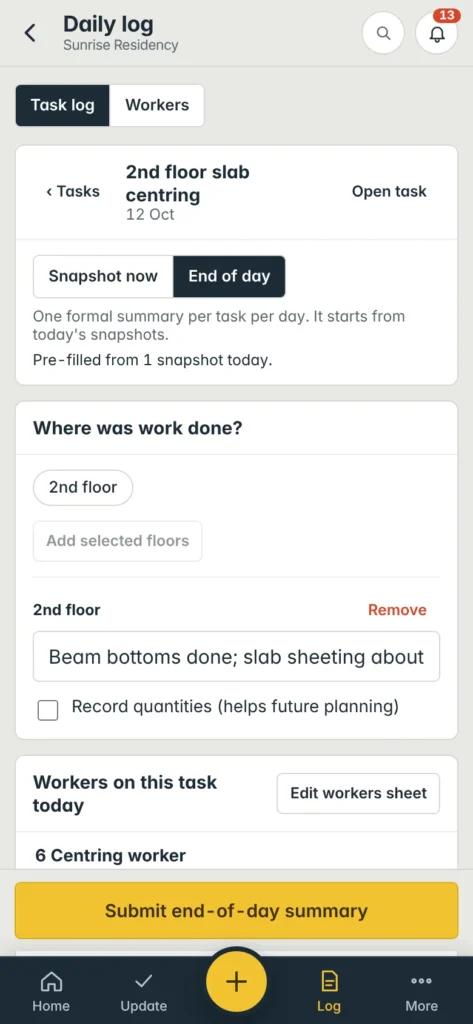
- Phone: Log in the bottom bar, or + → Daily log.
- Computer: Daily log in the left menu.
- From a task: the Daily log button on the task page or the task details panel.
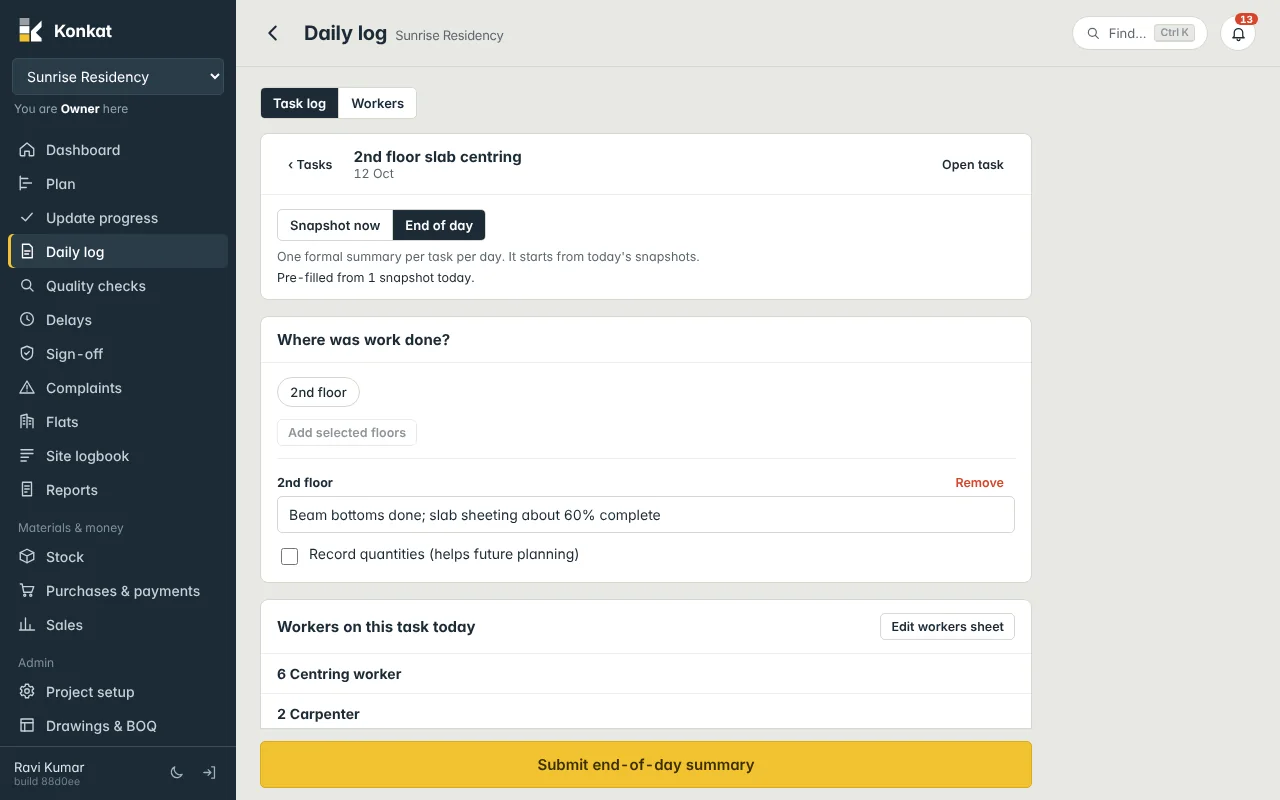
The screen has two tabs: Task log (this article) and Workers (see Workers sheet). Pick a task from the list — it is grouped the same way as in Update progress. ‹ Tasks goes back to the list; Open task opens the task page.
Snapshot or End of day#
| Snapshot now | End of day | |
|---|---|---|
| What | A quick record of what is happening right now. | One formal summary per task per day. |
| How many | As many as you like. | One per task per day. |
| Starts from | The task’s planned crew. | Today’s snapshots, merged. |
| Material used | — | Yes, in Material used today. |
When you choose End of day after sending snapshots, Konkat says Pre-filled from 2 snapshots today: the places and notes are joined, and the crew is the largest number seen for each worker type. If today’s end-of-day summary already exists, Konkat opens it for editing (You’re editing today’s end-of-day summary).
Fill in the log#
- Where was work done? — for a floor task, tap the floors and Add selected floors; for a flat task, pick the floor, tap the flats (and rooms, if you want) and tap Add … flat(s). If the task has only one floor or flat, it is added for you.
- Say what was done — under each place, type a line, e.g. Beam bottoms done; slab sheeting about 60% complete. Tick Record quantities (helps future planning) to add a quantity and unit (e.g. 120 sqft).
- Crew — set the number of each worker type with − and +. If today’s workers sheet is filled, this panel instead shows Workers on this task today from the sheet, with Edit workers sheet.
- Photos — Camera or Choose photos. See Photos.
- Notes — a one-line Progress summary (e.g. Poured GF columns — 3 of 4 done) and Remarks: anything you noticed — quality, crew, materials, weather, concerns.
- Material used today (end of day only) — + Add, pick the material, quantity, unit and any waste.
- Send — Send snapshot or Submit end-of-day summary.
Remarks build the project’s handbook of lessons — what went wrong, what worked. A good remark: Shuttering plates from yard bent; 6 replaced. Curing water short in afternoon.
What a log does#
- Days used — each day with at least one log on a task counts as one used day. When used days pass the plan, the task becomes Overrun.
- Status — a task with no floors or flats moves from Not started to In progress with its first log. (Floor and flat tasks change status only through Update progress.)
- Stock — materials picked from the list in Material used today are taken out of this project’s site store.
- Record — the log appears on the task page, in the Site logbook and in reports, with your name and time.
Crew in logs vs the workers sheet#
When a day has a workers sheet, the sheet is the attendance record for that day and the crew numbers in task logs are not used, so nobody is counted twice. The Crew panel shows the tip: the Workers tab records everyone once for the whole site — best when the same people work on several tasks.
Editing and corrections#
- Your own entry, same day — tap Edit on it (task page or Site logbook) and change it freely.
- Someone else’s entry, or an earlier day — this is a correction. Only the project owner, or someone the owner allowed (Can correct logs on the Team), can do it. They tap Correct, change the entry, and give a Reason for the correction. A copy of the entry as it was is kept. Delete this entry removes it, also with a reason.
See Corrections.
Photo rule#
If your profile has Must attach a photo to every log and QC entry, a new log can’t be sent without at least one photo.
Common questions#
I tried to submit a second end-of-day summary.#
Konkat says Already submitted and offers Open to edit. There is one per task per day.
Can I log for yesterday?#
The log is for today. To fix an earlier day’s entry, ask someone who can correct logs.