Complaints
Log snags and customer complaints on the whole building, a floor or a unit, assign them and track each one to closure.
On this page
Complaints is where you track problems that are not tied to one task: snags your team finds during finishing, and complaints from customers before or after handover. Each complaint is on the whole building, a floor or a unit, with photos, an assignee, a fix-by date and a clear status.
Who can do what#
| Action | Role right needed | Built-in roles that have it |
|---|---|---|
| See complaints | Anyone on the project | All |
| Log a complaint (+ Complaint) | Log complaints | Owner, Admin, Engineer, QC, Supervisor |
| Assign, set fix-by, close, reject, reopen | Handle complaints | Owner, Admin, Engineer, QC |
| Start work and Mark resolved | The assigned person, or Handle complaints | — |
| Edit the complaint | The person who logged it, or Handle complaints | — |
A custom role such as “Sales” can be given Log complaints so the sales team can record what customers report. See Roles and permissions.
Log a complaint#
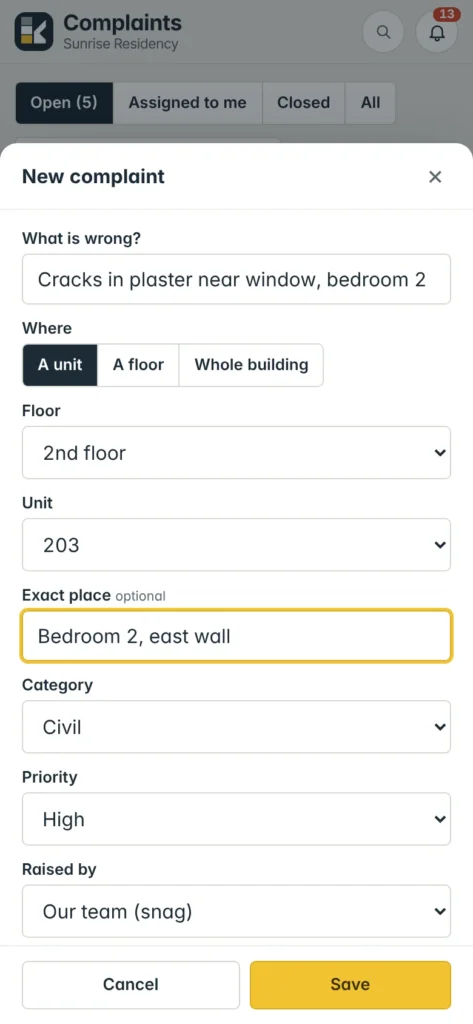
- Open the form — press + Complaint, or on a phone the yellow + → Complaint.
- Say what is wrong — a short title in What is wrong?, e.g. “Seepage in master bathroom ceiling”.
- Choose Where — A unit (pick Floor to narrow the list, then Unit), A floor (pick the floor) or Whole building (optional Block / wing). Add the Exact place if useful, e.g. “Kitchen sink wall, lift lobby”.
- Category and priority — Category: Civil, Plumbing, Electrical, Waterproofing / leakage, Tiles & flooring, Painting, Doors & windows, Carpentry, Lift, Common area, Cleaning or Other. Priority: Low, Normal, High or Urgent.
- Raised by — Our team (snag) or Customer. For a customer complaint on a unit you can leave the customer blank: Konkat fills it from the unit’s booking.
- Details and photos — describe it and add photos. Photos can only be added when the complaint is first logged.
- Assign — if you can handle complaints, choose Assign to and Fix by now. The assignee is notified.
- Save.
Status flow#
| Status | Meaning | Buttons |
|---|---|---|
| Open | Logged, not started. | Start work, Mark resolved, Reject |
| In progress | Someone is working on it. | Mark resolved, Reject |
| Resolved — to close | Fix done, waiting for a manager to check. | Close or Not fixed — reopen |
| Closed | Accepted. | Reopen |
| Rejected | Not a valid complaint, with the reason. | Reopen |
- Mark resolved asks What was done to fix it? (required) and Photos after the fix. The person who logged it gets “Complaint resolved — please check and close”.
- Reject asks Why is it rejected? (required).
- Not fixed — reopen asks What is still wrong?; the note is added to the details.
Finding complaints#
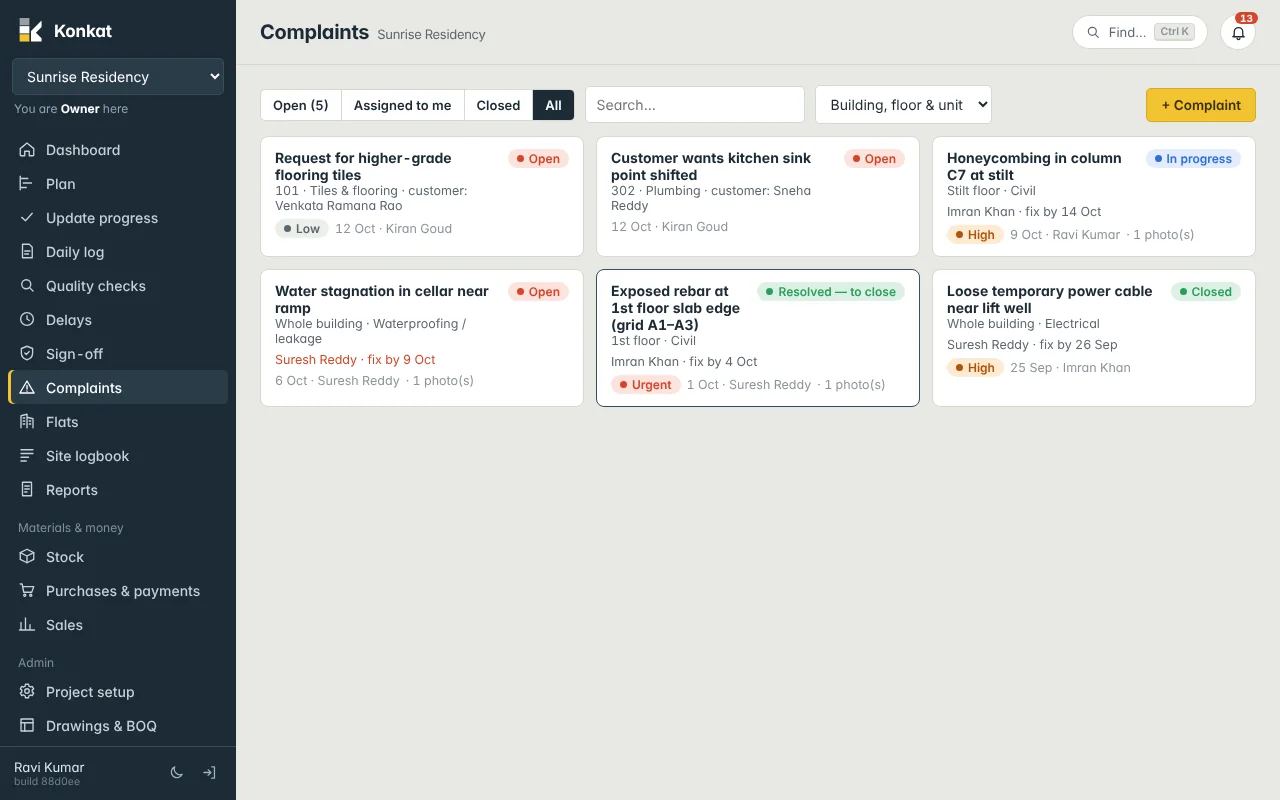
The tabs are Open (with a count — open, in progress and resolved-to-close), Assigned to me, Closed and All. Rejected complaints appear under All. Use Search… for title, unit, category or customer, and the Building, floor & unit box to show only one kind. Cards show the assignee and fix-by date; an open or in-progress complaint past its fix-by date shows in red.
Customer complaints after handover#
Each unit’s complaints are linked to its customer through the booking made in Sales. People with Sales (CRM) rights also see a Customer list in the form to pick someone directly. Example: Sneha Reddy of flat 302 calls about the kitchen sink point. Kiran logs it as Customer, Plumbing, unit 302; Suresh Reddy assigns it to the plumbing subcontractor’s supervisor with fix by Saturday; after the fix he closes it.
Use Quality checks for defects found while a task is being built, and Complaints for anything found later or reported by a customer.
Common questions#
Can the person who fixed it close the complaint?#
Only if their role has Handle complaints. Otherwise they mark it resolved and a manager closes it.
Can I add more photos later?#
After logging, new photos come in with Mark resolved (after-fix photos).