Receiving deliveries
Record what arrived against a purchase order with the challan number; it goes into stock at the order rate, part deliveries included.
On this page
When a lorry arrives at site with a challan, the storekeeper records the delivery on its purchase order. Konkat adds the material to the order’s store at the order’s rate and updates what the order still has to bring — so you always know what has come and what is pending.
Who can receive#
People with Purchase orders or Stock in / out on the project. The order must be Ordered or Partly received — a draft has to be placed first (“Mark the order as Ordered before receiving against it”). People without money rights see quantities only while receiving.
Record a delivery#
- Open the order — Purchases & payments → Purchase orders → tap the order.
- Press Receive delivery.
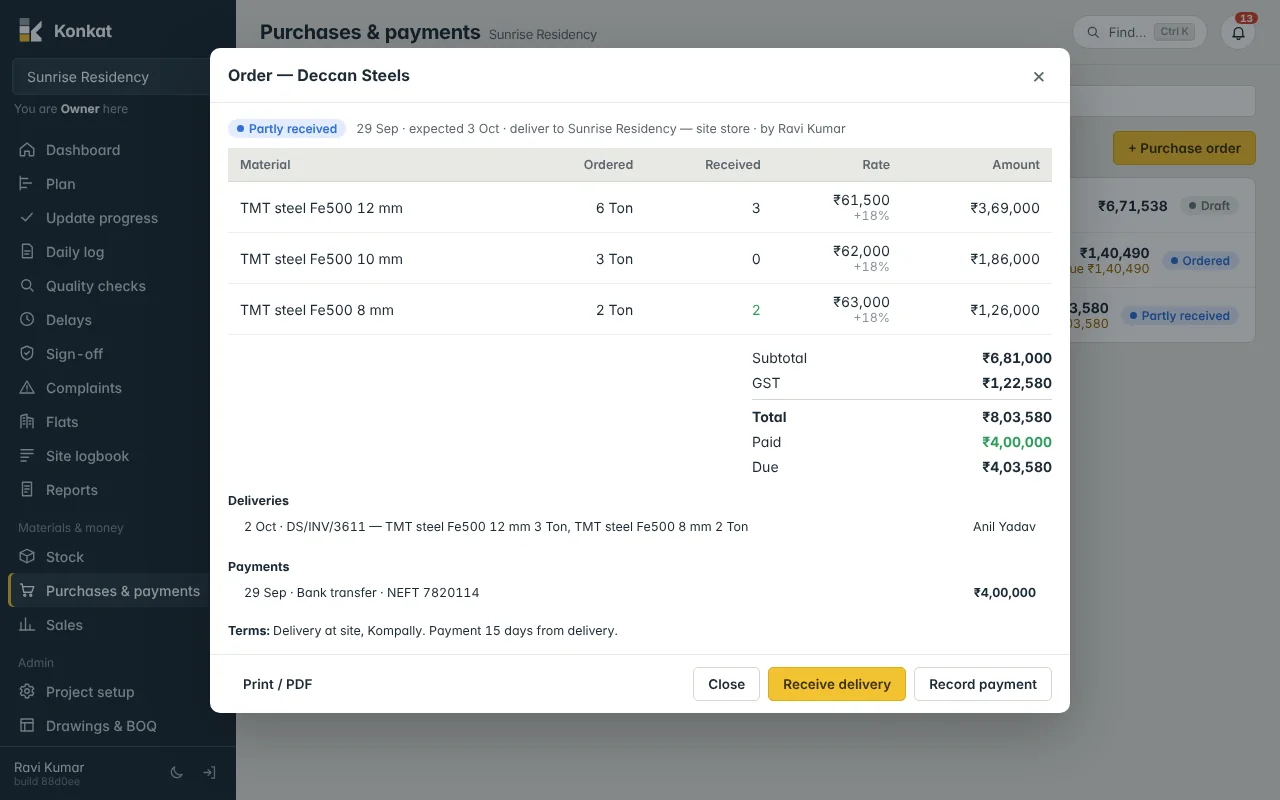
- Date and challan — the Date it arrived (not in the future) and the Challan / bill no., e.g. DS/INV/3611.
- Quantities — each line shows “ordered 6 Ton, received so far 3” and is filled with what is still to come. Change it to what actually came; set 0 for lines that didn’t come.
- Notes — anything about the delivery, e.g. “2 bags torn”.
- Add to stock — Konkat shows “Delivery recorded — added to stock”.
What happens in stock#
- A Stock in movement is made into the order’s Deliver to store, with the supplier, the order and the challan number. It appears in Movements and in the order’s Deliveries list.
- Quantities are converted to the stock unit: 3 Ton of steel becomes 3,000 Kg; 10 Brass of sand becomes 28.3 Cum.
- The value is the order rate without GST, per stock unit: steel at ₹61,500 a Ton goes in at ₹61.50 a Kg, so 3 Ton adds ₹1,84,500 of stock.
- Any below zero line on the Stock tab (usage logged before the delivery) comes back up.
Part deliveries and status#
| After this delivery | Order status |
|---|---|
| Nothing has arrived yet | Ordered |
| Some quantity on some line has arrived, but not all | Partly received |
| Every line has arrived in full | Received |
Example: Deccan Steels is ordered 6 Ton of 12 mm, 3 Ton of 10 mm and 2 Ton of 8 mm. On 2 Oct, 3 Ton of 12 mm and 2 Ton of 8 mm arrive — the order is Partly received. When the remaining 3 Ton of 12 mm and 3 Ton of 10 mm come on 6 Oct, it becomes Received. If the dealer says the 10 mm can’t be supplied, press Close instead and order it elsewhere.
Enter what really arrived. Konkat does not stop you entering more than was ordered: the extra goes into stock, but the order’s Received column stops at the ordered quantity. If a supplier sends extra, make a separate order or a Stock in for it.
Correcting a wrong delivery#
Open Stock → Movements, find the Stock in for that challan and press Cancel with a reason. The order’s received quantities and status go back. Then receive it again correctly. You can’t cancel it once that material has been used or moved — record a Count correction instead. See Stock and movements.
Delivering to a central yard#
If the order’s Deliver to is a central store, the delivery goes there. Move it to site later with a Transfer, or through a material request.
Common questions#
Can I receive without a purchase order?#
Yes — use Stock in on the Stock tab for cash purchases, with the supplier and bill number. The money summary only counts orders, so record its payment in Payments.
Does receiving record the bill?#
Konkat keeps the challan / bill number on the movement. Paying the bill is a separate step — Payments.