Auto BOQ
Konkat adds up the materials your whole plan needs from task quantities and recipes, and compares them with what is ordered, received, used and on site.
On this page
The Auto BOQ is a material bill of quantities worked out from the plan. Give tasks a type of work and a quantity (e.g. “RCC slab with steel”, 42 cum); Konkat multiplies by the recipe, including wastage, adds it up for the project and shows the shortfall you still have to arrange.
Give tasks an estimate#
Only tasks that are not groups can carry an estimate. There are two places to set it:
- Task form → section Material estimate (optional — feeds the automatic BOQ): choose Type of work and enter Quantity of work. The materials appear as tags; Put these in the materials list copies them to the task’s materials. See Task form.
- Drawings & BOQ → Auto BOQ (materials) → + Estimate a task: pick the task, type of work and quantity. On the Tasks view press Edit on a line to change it, or choose — none (remove estimate) —.
Setting estimates needs Edit the plan (Owner, Admin, Engineer by default).
Worked example — 3rd floor slab#
The 3rd floor slab is 42 cum. With “RCC slab with steel”:
| Material | Per cum | Wastage | For 42 cum |
|---|---|---|---|
| Cement OPC 53 | 8.06 bag | 2% | 345.3 bags |
| River sand / M-sand | 0.42 cum | 5% | 18.52 cum (about 6.5 Brass) |
| Aggregate 20 mm | 0.84 cum | 5% | 37.04 cum (about 13.1 Brass) |
| TMT steel Fe500 | 90 kg | 3% | 3,893.4 kg |
| Binding wire | 0.9 kg | 0% | 37.8 kg |
Do the same for each slab, column set, wall and finish, and the Auto BOQ becomes the material budget for the whole building.
The Materials view#
| Column | Meaning |
|---|---|
| Whole plan | Total for every estimated task. |
| Still to do | Only tasks not finished (done, verified and awaiting sign-off count as finished). |
| Next 30 days | Unfinished tasks starting in the next 30 days — the same figure as “Tasks need” in the forecast. |
| Ordered / Received | On placed purchase orders (not drafts or cancelled), converted to the stock unit. |
| Used | Used on site on this project. |
| On site | Stock in this project’s stores. |
| Shortfall | Still to do − on site − still to arrive on open orders, or OK. |
Example from the demo: cement still to do 4,223.7 bags, 185 on site, nothing pending on orders → shortfall 4,038.7 bags. 10 mm steel: still to do 8,940.4 kg − 3,629 on site − (9,000 ordered − 6,000 received) = 2,311.4 kg.
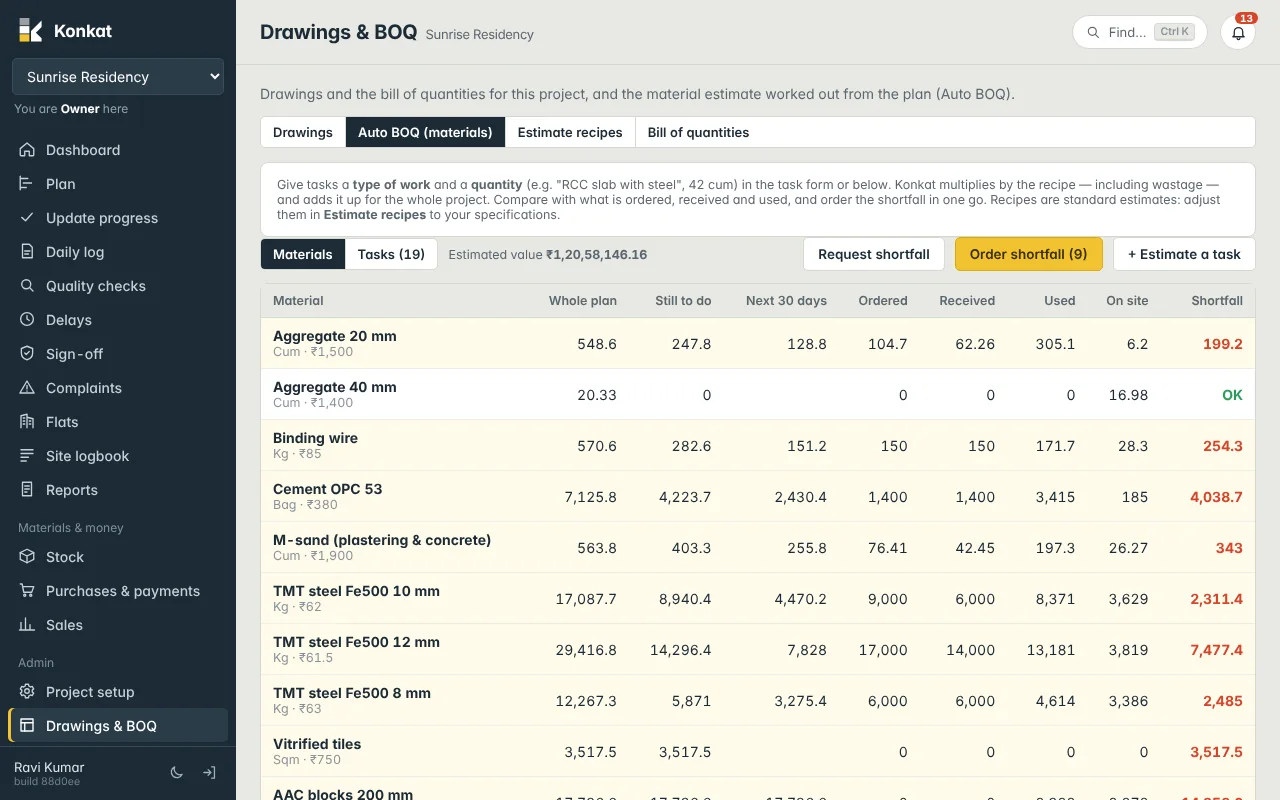
Estimated value at the top is the whole plan × each material’s usual rate. The Tasks view lists each estimated task with its recipe, quantity, start date, status and materials.
Act on the shortfall#
- Request shortfall — opens a material request with every short material. Needs Request material.
- Order shortfall (n) — opens a new purchase order with them; pick the supplier, remove what they don’t supply, and check rates. Needs Purchase orders.
The shortfall is for the whole remaining plan. For what to buy this week, use the Stock forecast, which looks at daily use, lead times and the next 30 days.
Who can open it#
On a computer, Drawings & BOQ is in the menu for roles with Drawings, BOQ & estimates. The Auto BOQ figures are also visible to people with See stock on a phone (More → Drawings & BOQ).
Common questions#
Why is a task not in the Auto BOQ?#
It needs both a type of work and a quantity above zero, and it must not be a group task.
Does Auto BOQ replace the Bill of quantities tab?#
No. Bill of quantities is your own list of work quantities; Auto BOQ is the material estimate from the plan. See Drawings and folders.