Money summary
One page with what the project has ordered, paid and still owes, the value of material used, and sales booked and collected.
On this page
The Money summary puts the project’s money on one page: what you have committed to suppliers, what you have paid and still owe, the value of material consumed on site, and how much you have sold and collected from buyers. It is built from purchase orders, payments, stock usage and bookings — there is nothing to enter here.
Who can see it#
People with Payments & money on the project. Open Purchases & payments (Purchases on a phone) → Money summary.
The figures#
| Tile | What it adds up |
|---|---|
| Ordered (POs) | Totals (with GST) of all purchase orders except drafts and cancelled ones. |
| Paid out | Every payment made on the project — against orders, labour, subcontract, transport, everything. |
| Still to pay suppliers | For each supplier: ordered − paid against their orders, added up (only amounts owed, never negative). |
| Material used on site | Value of all Used on site movements, at each store’s average rate. See Stock and movements. |
| Sales booked | Agreement values of all bookings that are not cancelled. |
| Received from customers | All money received recorded on the project. |
| Balance from customers | Sales booked − money received against those bookings. |
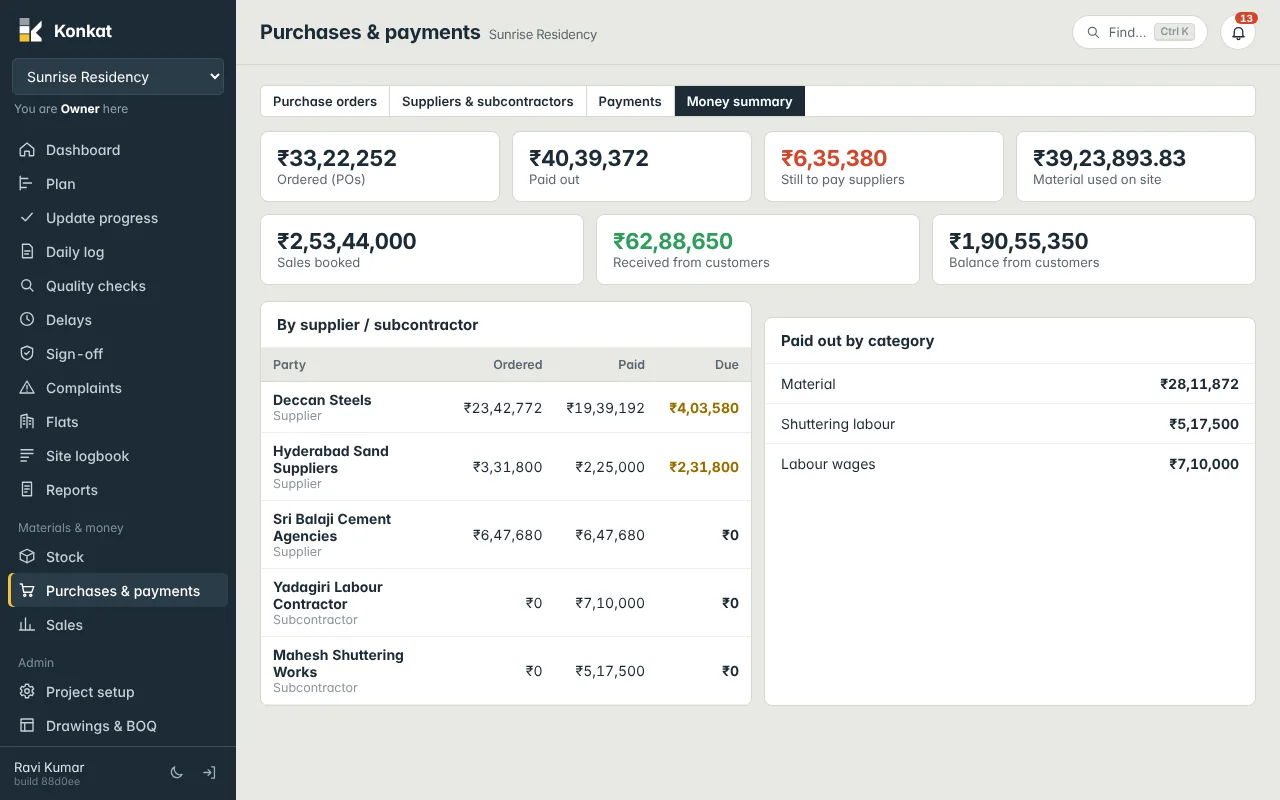
By supplier / subcontractor#
One row per party with Ordered, Paid and Due, largest due first.
- Paid includes payments against orders and other payments to that party.
- Due is ordered − payments against orders only.
So subcontractors paid on running bills (no orders) show Ordered ₹0, their payments, and Due ₹0. And if part of a supplier’s payment was recorded without picking the order, Paid − Ordered won’t match Due: in the picture, Hyderabad Sand Suppliers show Ordered ₹3,31,800, Paid ₹2,25,000 but Due ₹2,31,800, because ₹1,25,000 was paid without linking an order. Link the payment to its order and the due corrects. See Payments.
Paid out by category#
All payments made, grouped by their category — Material, Labour, Subcontract, Transport, Machinery hire, Rent, Fees & approvals, Other. Payments without a category appear as Purchase orders / other.
Reading it — an example#
- Deccan Steels: ordered ₹23,42,772, paid ₹19,39,192, due ₹4,03,580 — the balance on the partly received 29 Sep order.
- Material used on site ₹39,23,893 is the cost of what has gone into the building so far — compare it with the Material category (₹28,11,872 paid) and the dues to see how much consumed material is still to be paid for.
- Customers: three bookings worth ₹2,53,44,000; ₹62,88,650 collected; ₹1,90,55,350 balance. What is due now per booking is on the Sales screen — see Customer payments.
How the modules feed it#
- A purchase order is placed → Ordered goes up.
- The delivery is received → stock rises at the order rate.
- Material is used through daily logs or Used on site → Material used on site goes up.
- A payment is recorded → Paid out rises and Still to pay falls.
- A unit is booked and money received → Sales booked and Received from customers.
This is a management view, not accounts. Konkat’s purchases, payments and sales are kept separately from ERPNext and nothing is posted to ERPNext ledgers, GST returns or bank reconciliation. See Konkat and ERPNext.
Common questions#
Why is Paid out bigger than Ordered?#
Paid out also includes labour, subcontract and other payments that have no purchase order.
Does Ordered include GST?#
Yes, it uses the order totals. Material used on site is valued without GST, at the stock rate.