Materials and units
Set up the shared material list, the unit each material is counted in, the unit it is bought in, rates, GST, reorder levels and lead times.
On this page
Every stock movement, request, purchase order and estimate in Konkat refers to a material from one shared list. This list — and the units of measure — live under Stock → Materials & units and are shared by all your projects.
Who can change the list#
Everyone who can open Stock (See stock) can see the list. Adding or changing materials and units needs Stock in / out on at least one project — Owner, Admin, Engineer and Supervisor have it by default, and a custom role like Storekeeper can be given it.
The Rate column on this tab shows each material’s usual rate to everyone who can open it. Values of actual stock and orders are hidden from people without money rights — see Stock and movements.
Counted in and bought in#
Each material has two units:
- Counted in (the stock unit) — what the store keeps track of: Bag, Kg, Cum, Nos, Sqm, Ltr…
- Bought in — only if suppliers sell it in a different unit: Brass, Ton, Box, Bag. You then say 1 Brass = how many Cum?
| Material | Counted in | Bought in | Conversion |
|---|---|---|---|
| River sand / M-sand | Cum | Brass | 1 Brass = 2.83 Cum (100 cft) |
| Aggregate 20 mm | Cum | Brass | 1 Brass = 2.83 Cum |
| TMT steel Fe500 | Kg | Ton | 1 Ton = 1,000 Kg |
| Vitrified tiles | Sqm | Box | 1 Box = 1.44 Sqm |
| Wall putty | Kg | Bag | 1 Bag = 40 Kg |
| Cement OPC 53 | Bag | — | Same as stock unit |
Wherever you enter a quantity — a stock entry, a delivery, a purchase order — you can choose either unit. Konkat converts to the stock unit. Example: a delivery of 10 Brass of M-sand adds 28.3 Cum to the store. If the order rate was ₹5,377 per Brass, the stock rate becomes ₹1,900 per Cum.
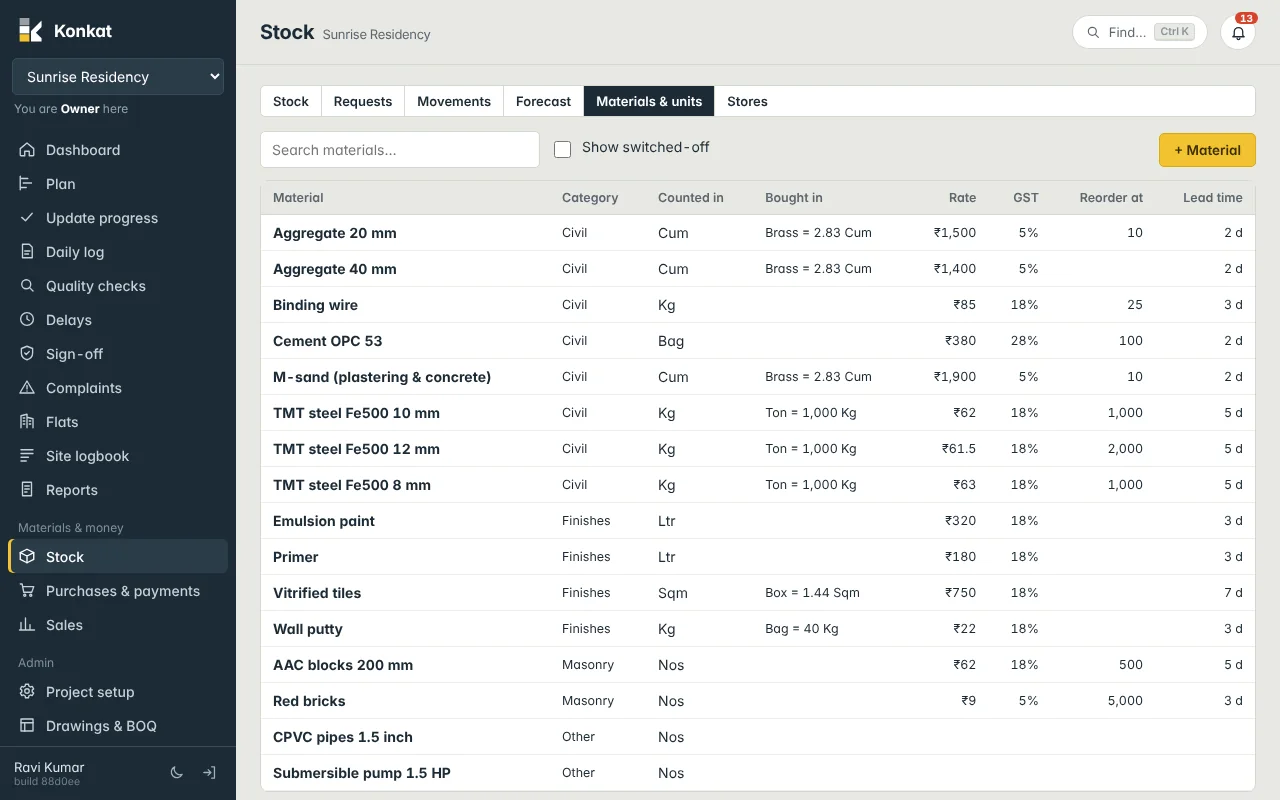
Add or edit a material#
- Open the tab — Stock → Materials & units, then + Material (or tap a row to edit).
- Name and code — Material, e.g. “TMT steel Fe500 12 mm”, and an optional Code. Names must be unique.
- Category — Civil, Masonry, Finishes, Electrical… (pick an existing one or type a new one).
- Units — Counted in, and Bought in if different, with how many stock units are in one bought-in unit.
- Money and timing — Usual rate ₹ per stock unit, GST %, Lead time (days to arrive) and Reorder level (warn when stock falls below this).
- Save.
You can also add a material on the spot from any material picker — choose + New material… at the bottom of the list. That quick form asks only for Material, Counted in, Category and Usual rate.
What each setting is used for#
- Usual rate — the default rate for Stock in and new purchase orders (multiplied up for the bought-in unit), the value of stock when nothing better is known, and the Estimated value in Auto BOQ.
- GST % — the default GST on purchase order lines.
- Reorder level — Stock shows Below reorder level and the forecast flags it.
- Lead time — the forecast flags a material that will run out within its lead time + 3 days.
Switch off or delete#
Delete removes a material that has never been used. If it was used in stock, an order, a recipe or a request, Konkat switches it off instead (“Already used — switched off instead”). Switched-off materials are hidden from pickers; tick Show switched-off to see them, and untick Switched off (hidden from lists) to bring one back.
Units of measure#
The Units of measure panel lists every unit. Konkat starts with Nos, Bag, Kg, Ton, Cum, Cft, Brass (100 cft), Sqm, Sqft, Rmt, Rft, Ltr, Box, Set, Bundle, Pair, Trip, Roll, Sheet and Drum. Press + Unit to add one — e.g. “Tractor load” meaning “about 100 cft” — and tick Only whole numbers for units you never split. A unit can’t be renamed (add a new one instead) and can’t be deleted while a material uses it.
Common questions#
Should sand be counted in Brass or Cum?#
Count it in Cum and buy it in Brass. Recipes and site usage are in Cum; suppliers bill in Brass; Konkat converts with 1 Brass = 2.83 Cum.
Can I keep separate items for 8, 10 and 12 mm steel?#
Yes. Make one material per diameter (as in the demo) and adjust the RCC recipes to use them — see Estimate recipes.